PowerPointPipe - Batch Find and Replace for PowerPoint
Rebrand and Fix Thousands of Presentations in Minutes
PowerPointPipe performs batch find-and-replace across unlimited PowerPoint presentations — updating links, company names, slide masters, notes, and embedded objects automatically.
Trusted by Accenture, Boeing, Hewlett Packard, GSK and 700+ organisations worldwide.
Microsoft PowerPoint Office 365, 2019, 2016, 2013, 2010, 2007 · Microsoft® Windows® 11, 10, 8, 7, Vista®, 2019/2016/2012/2008/2003, x32 and x64

Measured Results
Presentations Rebranded
Global manufacturer updated across 30 offices in 1 week. Read story →
Setup Time
Add your replacements, point at files, click Run. That's it.
Slide Master Support
Updates Slide Masters, Notes Masters, Title Masters, and Handout Masters — changes propagate to all slides.
How It Works
Add Replace Pairs
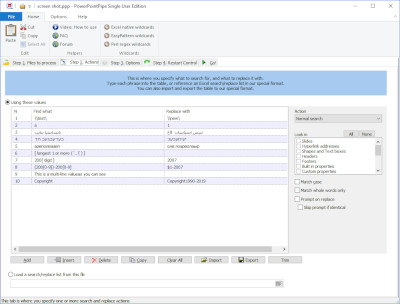
Type directly, import from Excel/CSV. Specify where each replacement applies — slides, notes, masters, hyperlinks, properties.
Select Files
Choose a folder, network share, or SharePoint library. Process .ppt, .pptx, .odp, and custom types.
Run
PowerPointPipe handles everything — restarts PowerPoint on memory errors, skips corrupted files, logs every change.
Common Use Cases
Corporate Rebranding
Update company names, logos, addresses, and legal disclaimers across all presentation decks after a merger or rebrand.
Rebranding guide →Server Migration
Fix broken hyperlinks and embedded object paths when servers are renamed, consolidated, or moved to SharePoint.
Migration guide →Translation
Import word lists from the Marketplace and batch-translate slide content across hundreds of decks.
QMS & Compliance
Update version numbers, policy references, and standard language across training materials and compliance decks.
Part Number Updates
Change SKUs, product codes, and technical specifications across engineering and sales presentations.
Scheduled Automation
Command-line interface for batch jobs, XML settings files, Windows Task Scheduler integration.
CLI reference →Where PowerPointPipe Searches
Trusted by Enterprise Teams




Manufacturing Case Study → · Corporate Rebranding Case Study →
Simple Interface, Powerful Results
Choose Your Edition
Floating License · Full comparison chart → · Office Pipe Bundles
WordPipe Marketplace
Curated word lists compatible with PowerPointPipe — legal, medical, financial, broadcast terminology.
Browse MarketplaceDeveloper Center
CLI reference, batch examples, and Task Scheduler automation for PowerPointPipe.
Developer CenterReady to Fix Your Presentations?
Download the free trial and update your first batch in under 60 seconds.