|

Use
WordPipe Find and Replace for Word to migrate Microsoft Word hyperlinks
when you rename file servers, to translate files by applying massive search/replace
lists, or find and replace
your organization's name, address, website etc across thousands of worksheets
- automatically.
WordPipe is designed as a hands-off tool requiring next to no user
intervention, as you would expect for migrating large numbers of files. It
copes with a myriad range of Microsoft Word bugs, such as restarting
Microsoft Word every 1000 documents to avoid memory errors. It also copes
with the largest variety of problem documents of any tool, ranging from
password protected and corrupted documents to SharePoint locked
documents.
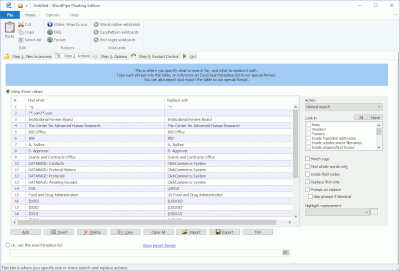
To use WordPipe, you simply add a list of
search/replace pairs, and for each one, specify where in the document it
should be found. Then you tell it which files to process - that's it!
- as
recommended by Microsoft! |
|
Biztree is the maker of Business-in-a-Box, the World's leading
business & legal forms software. Our library contains over 1,500 documents
in 4 different languages - it's over 15,000 pages of content. So no need to
say that when we need to apply changes to all our documents, doing it
manually is a Herculean task! I first discovered WordPipe about 3
years ago. I had tried different tools but nothing was working fine; these
other softwares were making our computers crash or even worst, corrupted the
documents. I was so happy after I bought WordPipe, what a great product! It
helped us save tens of hours of boring and unproductive work. The software
was very good at that time but I just upgraded to the latest version and it
is even better! It is SUPER stable and quicker than ever. I recommend
WordPipe to anybody who has to make bulk changes in Word - at this price you
can't afford not to use it. Jonathan Defoy
CEO, Biztree Inc |
Use it for...
- Standardizing corporate name changes such as your organization's phone number,
address, web site or CEO
- Performing server consolidations where document links need updating
- Migration of documents when a server is renamed or replaced and all Word
document links need updating
- Updating documents to use Microsoft Namespace Server mappings
- Standardize Policy Headers
- Technical editing - Marking words and phrases based on fixed
specifications
- Changing part numbers or SKUs across multiple files
- Removing digitized signatures from documents prior to converting them to
PDF and placing them on the web
- Translating documents
- Correcting OCR (scanned) documents
- Detecting 'TOP SECRET' documents that have been saved in the wrong folder (by
security identifiers located in headers)
- and much more. See our new
Timing calculator
Translators can use WordPipe's grid to define multiple search/replace
pairs. Check out our testimonial from a very
satisfied user!
| I actually went on line 10 minutes after trying the demo
and bought the full version. This thing is great! I figured in the first
job that I used it on I did the job for 50% of the cost of the soft dollars
it would have taken to do it manually.
494 files changed in about 20 minutes........I'm tickled to death.
Thanks much!
Ed Baumgarten
IT Manager
Mid America Motorworks |
Your contribution of WordPipe will enable our
Information Technology department to easily and rapidly update documents on
our intranet site, thereby providing timely and accurate information to our
76 chapters and 28 international affiliates around the world. This
contribution translates into savings of dollars and valuable staff time,
thus allowing more time and money to be devoted to the Make-A-Wish
Foundation's mission of granting the wishes of children with
life-threatening medical conditions to enrich the human experience with
hope, strength and joy. Paul Velaski
CFO & Vice President
Make-A-Wish Foundation of America |
User benefits
- Fast!
- No limit on the number of documents processed - use it across an entire
file server or web server
- Translators can import search/replace lists from Excel, CSV- or
Tab-delimited files
- Easy to use with integrated online help
- In addition to supporting all of Microsoft Word's search and replace options,
WordPipe offers many more, such as hyperlinks, bookmarks, drop down fields
and more.
- Stand-alone - doesn't integrate directly with Microsoft Word so it doesn't
destabilize your installation
- Hyperlink report/pre-migration analysis can identify the existing links
and what they would be changed to (complete report in full version only)
- Lite version works with documents located on the local system. Pro
version works with documents locally, on File Servers or NAS, Novell cluster
volumes etc.
- Translations are available for other languages
| My initial use was a smashing success and I am
recommending to our IT manager that it is definitely helpful and worth
getting. It was truly a great time saver. Janet Aldrich |
Features
- New! Accept all revisions before starting.
- Highlight option on replacement
- Now searches and replaces hyperlinks inside footnotes, endnotes and
comments
- Now can search/replace document templates
- Now can update ISO-9001
version numbers
- Search and replace inside form drop down fields
- Search and replace inside bookmark names to ensure
consistency across multiple documents.
- Now handles locked fields - and restores the lock after making
changes
- Search and replace inside the headers and footers of multiple sections
- Search and replace inside text boxes, shapes and inline shapes, and
now inside grouped shapes
- Search and replace inside hyperlinks and hyperlink addresses
- Search and replace UNC link paths
- Search and replace inside field codes
- Search and replace inside built in document properties and
custom properties such as Title, Subject, Author, Company etc
- Search and replace graphics and company logos - see the
FAQ
- Search and replace inside VBA Code Modules - even if protected
with a password.
- Search and replace inside OLE and DDE Links
- Search Only mode - very handy for detecting where replaces would occur
- Fully Unicode compliant - search and replace international character
sets (unlike competing products)
- Allows replacements to be longer than 255 characters (Microsoft Word
limits this to 255)
- Search and replace with all Word's options such as Wildcards (pattern
matching), Match Case, Whole Words only, Sounds Like, Find All Word Forms
- Works with Windows SharePoint Services document libraries
- Files can be specified by folder (optionally including sub folders), by
importing from a list file, or by pasting in a list of filenames
- Control the document types used - so you can process .doc, .rtf, .html, .htm,
.dot, .txt, .asc, .ans, .wri, .mcw, .wpd, .wps or any custom document type
- Can be automated or scheduled via the command line, and settings are saved
in an easy-to-edit or generate XML format
- Handles documents with password for open or modify
- Handles protected documents - and restores the original protection after
making changes
- Handles mail merge documents
- Read only documents can be processed or skipped
- Read only recommend documents are processed with NO user
intervention
- Easy to install/uninstall
- The original file date and time stamp can be preserved.
- Does not alter documents unless a change is made. In Search Only mode,
no changes are made.
- All settings can be saved and re-loaded later, allowing you to manage
multiple jobs.
- Full backup facility, and the ability to rollback if the results are not
acceptable.
- Full audit trail on completion, logging the changed documents, unchanged
documents and error documents.
- Beware of cheap imitations.
| I just processed over 4000 docs in 3 hrs! |
Microsoft SharePoint Services
To use WordPipe with Microsoft SharePoint Services, just specify a UNC path
to the document root e.g. \\servername\path
Screen shot
WordPipe's default screen (Click for more) |
In 453 Word documents, I let WordPipe search for "und"
and replace it by "XXX". There were 82429 (!) occurrences. It took
only 10
(TEN!!!!) minutes Michael Hentschel
It's a remarkably powerful utility which-if you need it-can't be beat. It's
an industrial strength search & replace utility for Microsoft Word. Without
opening a single Word file, you can quickly change thousands of documents
with the push of a button. Think Batch Operation-On-Steroids. Say you
change your phone number and need to correct your letterhead in hundreds of
documents. Just launch WordPipe and you're home free.
Now that's cool! -DingBat Magazine |
Clients
WordPipe is currently being used by a range of clients across the world such
as
- African Products Pty (Ltd)
- Arten Technology Group
- Business Filings Inc
- CNH Consulting
- Contassur Assistance Conseil
- County of Winnebago, Illinois
- Datahr Rehabilitation Institute
- Diedre Moire Corporation
- Eriksen Translations Inc
- halbzoll
- H. A. Guden Co
- Midway USA
- Office of State Revenue - Qld Treasury
- Parker Hannifin R/S
Div
- PDG Architechts (sic)
- Pfizer Inc
- Pierson Behr, Attorneys
- Roche Palo Alto
- Sande Sistemas de Informaci? SL
- Scottish Power Generation Ltd
- Softwise Inc
- Standard Aero Ltd
- TM Communications Inc
- UCLA
- Wellington City Council
- Wells Fargo
- and more.
Download evaluation

Tour
(requires Flash)
Buy
Lite Edition US$ 99/EU€ 84.41*, Full Edition US$ 499/EU€ 425.44* , Full vs Lite comparison chart.
Technical specifications
- Microsoft® Windows® 8 and x64, Windows 7 and x64, Vista®, Vista 64, 2008/2003 Server, XP
- All versions of Microsoft Word (2013, 2010, 2007, 2003, XP) or Microsoft Office
(2013, 2010, 2007, 2003, XP), but not Word 97
or Word Starter Edition (which is a cut-down version with zero integration
capability)
- Hard Disk with 2 MB free disk space
- 32 MB RAM
Multi-user, Site and Enterprise licenses are also available to enhance the
efficiency of your entire team.
Awards
|
|
|
|
Editor's Pick at Brothersoft |
 |
Wareseeker.com - Editor's Pick - April 2010 |
 |
|
 |
SoftChecker.com, Jul 2005 |
 |
CriticalFiles.com, Jun 2005 |
 |
4 Cows at Tucows
|
|
Editor’s pick, their highest award (Jan 2003) |
See also
- TextPipe industrial strength text conversion,
transformation, cleansing and extraction workbench
- ExcelPipe search and replace in Excel spreadsheets
- PowerPointPipe search and replace in
PowerPoint presentations
- DataPipe search and replace in live database records
- ResumePipe if you need to cleanse and process emails