ExcelPipe - Batch Find and Replace for Microsoft Excel
Update Thousands of Excel Spreadsheets in One Click
ExcelPipe performs batch find-and-replace across unlimited Microsoft Excel files — updating data source connections, hyperlinks, images, server paths, and cell content automatically.
Trusted by Accenture, Boeing, Hewlett Packard, GSK and 700+ organisations worldwide.
Microsoft Excel Office 365, 2019, 2016, 2013, 2010, 2007 · Microsoft® Windows® 11, 10, 8, 7, Vista®, 2019/2016/2012/2008/2003, x32 and x64

Measured Results
Replacements in 94 Files
"Replaced 8,463 strings flawlessly" — Don, Translator
Spreadsheets in 2 Hours
Healthcare network server migration with zero compliance gaps. Read story →
Tool That Replaces Images
The only batch tool that can search and replace images inside Excel spreadsheets.
How It Works
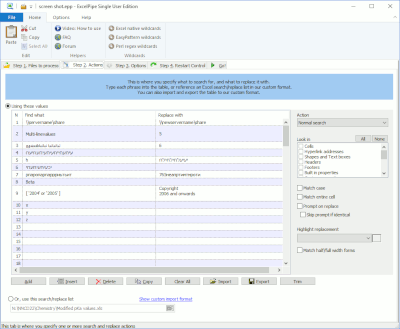
Add Replace Pairs
Type directly, import from Excel/CSV, or paste a list. Specify where each replacement applies — cells, hyperlinks, data sources, images, sheet names.
Select Files
Choose a folder (with subfolders), a network share, or SharePoint library. Process .xls, .xlsx, .ods, and custom types.
Run
ExcelPipe handles password-protected files, corrupted workbooks, and restarts Excel automatically on memory errors. Full audit log on completion.
60-second overview — see ExcelPipe fix link rot across an entire spreadsheet library
Common Use Cases
Server Migration
Update ODBC connection strings, pivot table sources, UNC paths, and hyperlinks when you consolidate or rename servers.
Migration guide →Data Source Updates
Change connection strings for Query Tables, Pivot Tables, ADO/DAO/OLEDB/ODBC queries, web queries, and DDE links in bulk.
Image Replacement
The only tool that batch-replaces embedded images in Excel. Update logos, product photos, and branding graphics across all workbooks.
Corporate Rebranding
Update company names, addresses, phone numbers, and legal disclaimers across your entire spreadsheet library.
Rebranding guide →Translation
Import massive word lists from the Marketplace and translate spreadsheet content across hundreds of files.
Scheduled Automation
Save jobs as XML, run via command line, schedule with Task Scheduler for unattended batch operations.
CLI reference →Where ExcelPipe Searches
ExcelPipe replaces content in places that Excel's own Find/Replace can't reach:
Trusted by Enterprise Teams




"ExcelPipe works like a dream. I'm amazed by its speed!"
— Michael Plant
"I ran a batch on 94 Excel files. 1008 strings. Replaced 8,463 strings flawlessly."
— Don, Translator
"My initial use was a smashing success. It was truly a great time saver."
— Janet Aldrich
Enterprise-Grade Capabilities
- Import replacement lists — From Excel, CSV, or Tab-delimited files. Handle thousands of replacements per run.
- Network shares & SharePoint — Process spreadsheets on file servers, NAS, and SharePoint via UNC paths.
- Password-protected files — Handles locked workbooks and flags them for manual follow-up.
- Full Unicode support — International character sets handled correctly (unlike competing products).
- Complete audit trail — Logs every change in every file for compliance verification.
- Backup & rollback — Full backup before processing with one-click restore.
- Preserves timestamps — Retains last-access dates for data retention compliance.
- Standalone operation — Doesn't integrate with Excel directly, preventing instability.
Simple Interface, Powerful Results
Choose Your Edition
Floating License · Full comparison chart → · Office Pipe Bundles
Marketplace & Developer Resources
WordPipe Marketplace
Curated word lists compatible with ExcelPipe — legal, medical, financial, and broadcast terminology for batch translation.
Browse MarketplaceDeveloper Center
Command-line reference, batch processing examples, and Task Scheduler automation guides for ExcelPipe.
Developer CenterRelated Products & Resources
Healthcare Case Study · Corporate Rebranding · Professional Services
Ready to Fix Your Spreadsheets?
Download the free trial and update your first batch in under 60 seconds.