ExcelPipe Banners
80 characters:
Excel Search and Replace - multiple documents, multiple search/replace terms
Short, 250 characters limit
ExcelPipe is used by IT personnel to change hyperlinks when a server gets renamed, by SMEs and large organizations when they change their contact details/name/etc, by translators to apply massive search/replace lists - the list of uses is endless.
Short, 450 characters limit
ExcelPipe is used by IT personnel to change hyperlinks when a server gets renamed, by SMEs and large organizations when they change their contact details/name/etc, by translators to apply massive search/replace lists - the list of uses is endless. ExcelPipe can change millions of documents, and make multiple changes simultaneously. It can be automated to run overnight or over a weekend, and it takes care of messy details like passwords.
Medium, 2000 characters limit
ExcelPipe is used by IT personnel to change hyperlinks when a server gets renamed, by SMEs and large organizations when they change their contact details/name/etc, by translators to apply massive search/replace lists - the list of uses is endless. ExcelPipe can change thousands or millions of documents, and can even make multiple changes simultaneously to save time. It can be automated to run overnight or over a weekend, and it takes care of passwords, protection, locked fields, read-only files and other messy details. To use ExcelPipe, you simply add a list of search/replace pairs, and for each one, specify where in the document it should be found. Then you tell it which files to process - that's it! ExcelPipe offers many more search and replace options than Microsoft Excel; such as hyperlinks, bookmark names, text boxes, shapes, drop down fields, document properties (such as Title, Subject, Author, Company etc) and more. Try it today - and see why Microsoft recommends ExcelPipe to its customers!
Long, 4000 characters limit
ExcelPipe is used by IT personnel to change hyperlinks when a server gets
renamed, by SMEs and large organizations when they change their contact
details/name/etc, by translators to apply massive search/replace lists - the
list of uses is endless.
<P>
ExcelPipe can change thousands or millions of documents, and can even make
multiple changes simultaneously to save time. It can be automated to run
overnight or over a weekend, and it takes care of passwords, protection, locked
fields, read-only files and other messy details.
<P>
To use ExcelPipe, you simply add a list of search/replace pairs, and for each
one, specify where in the document it should be found. Then you tell it which
files to process - that's it!
<P>
ExcelPipe offers many more search and replace options than Microsoft Excel; such
as hyperlinks, bookmark names, text boxes, shapes, drop down fields, document
properties (such as Title, Subject, Author, Company etc) and more.
<P>
Try it today - and see why Microsoft recommends ExcelPipe to its customers!
Images
| Size | Image and Link |
| 216x196 |  <img border="0" src="https://www.datamystic.com/images/excelpipe_box.jpg" width="216" height="197"> |
| 468x60 |
 <img border="0" src="https://www.datamystic.com/images/excelpipe_box468x60.jpg" width="468" height="60"> |
| 200x200 |
 <img border="0" src="https://www.datamystic.com/images/excelpipe_box200x200.jpg" width="200" height="200"> |
| 125x125 |
 <img border="0" src="https://www.datamystic.com/images/excelpipe_box125x125.jpg" width="125" height="125"> |
| 120x90 |
 <img border="0" src="https://www.datamystic.com/images/excelpipe_box120x90.jpg" width="120" height="90"> |
| 75x75 |
 <img border="0" src="https://www.datamystic.com/images/excelpipe_box75x75.jpg" width="75" height="75"> |
| 32x32 Icon |
 <img border="0" src="https://www.datamystic.com/images/excelpipe.gif" width="32" height="32"> |
| 807x575 Screen shot |
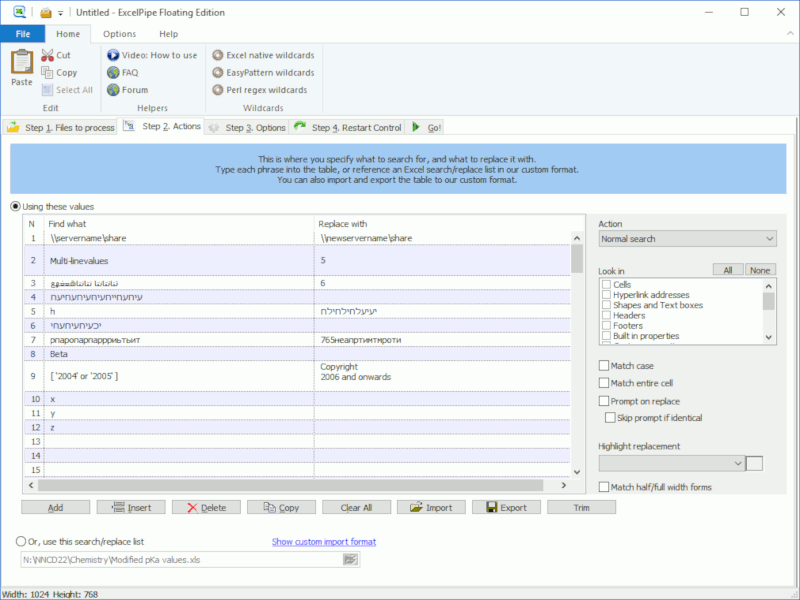 <img border="0" src="https://www.datamystic.com/images/excelpipe_screen.gif" width="807" height="575"> |