How to integrate
TextPipe Integration Partners are companies with complimentary product lines. TextPipe can add sophisticated data extraction and text manipulation functions with a minimal amount of integration.
We are constantly searching for companies with complimentary products. Please contact us if you would like to integrate TextPipe into your application.
Integration Options
TextPipe has been designed to integrate as easily as possible with existing applications. Here's how:
Command line interface - this is the most frequently used integration interface. This interface allows for filters to be constructed from the command line or for existing filters to be loaded and executed. Please see further below, or for more information, please see TextPipe's extensive help file - under Advanced\Command Line Options.
ActiveX/COM interface - this is an extremely powerful interface that allows TextPipe to be controlled from other applications. Please click here for detailed documentation.
Other links
-
See the help file for registry settings
Detecting if TextPipe is Installed
As an example, when Offline Explorer Pro does not detect TextPipe, it displays the following dialog:
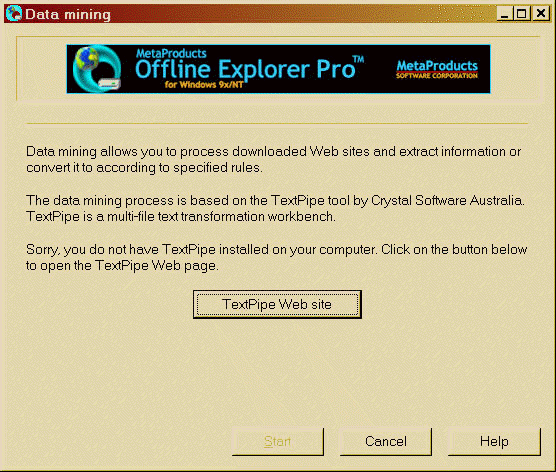
The [TextPipe Lite site] button takes the user's web browser to
http://www.datamystic.com/textpipe.html
Present TextPipe Options to the User
If TextPipe is installed, you need to display options to the user. The displayed options are documented further below.
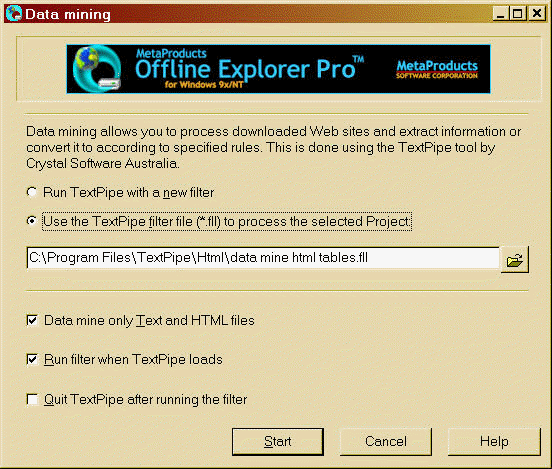
Use the TextPipe filter file (*.fll) to process the selected Project – runs TextPipe with the specified filter filename. Clicking on the browse button opens a browse dialog in TextPipe's installation folder (HKEY_LOCAL_MACHINE\SOFTWARE\Crystal Software\TextPipe\rootDir). The browse dialog only shows files with an extension of .fll.
Run TextPipe with a new filter – TextPipe is run without loading a filter. This is most often used when the user wants to perform a small custom set of filtering – e.g. adding their own search and replace operations.
Data mine only Text and HTML files – this is a Offline Explorer option that determines whether Offline Explorer sends TextPipe a complete list of every single file downloaded, or just those that Offline Explorer knows are text files.
Run filter when TextPipe loads – causes TextPipe to automatically begin running the specified filter after TextPipe has loaded. When this option is unchecked TextPipe simply loads and displays the filter and waits for user interaction.
Quit TextPipe after running the filter – causes TextPipe to exit when it has finished processing. When this option is unchecked TextPipe simply stops and shows the processing results and waits for user interaction.
Command Line Construction
The following table shows how to construct a TextPipe command line. The order is VERY important! Do not change it! See the TextPipe help file (under Advanced) for more details of command line parameters.
|
Param |
Command line option |
Description |
|
0 |
"[HKEY_LOCAL_MACHINE\ |
The location of the TextPipe executable. Is usually surrounded with double quotes "" because the install folder contains spaces (c:\program files\DataMystic\textpipe) |
|
1 |
"/F=filtername.fll" |
The filter file to load. Leave blank if there is no filter file to load. Specify the FULL path to avoid errors. Double quote it. |
|
2 |
"/L=listfile.txt" |
The name of the temporary file which contains the list of files and folders to be processed (may include wildcards). Double quote it. Specify the FULL path to avoid errors. Usually this is placed in the user's TEMP folder, but it can be anywhere. If you only want to process a small number of files, simple specify them on the command line directly instead of in the list file. Remember to double quote them! |
|
3 |
/deletelistfile |
If you want the listfile to be deleted after TextPipe has read it, specify this option. |
|
4 |
/G |
Tells TextPipe to immediately run the filter when it loads. |
|
5 |
/Q |
Tells TextPipe to exit after the filter has finished running |
Add Menu Items
Your users need to know that TextPipe is available! Offline Explorer uses two methods – a menu item in the Tools menu called "Data mining" – which is the function that TextPipe would be performing. It is also available for under Offline Explorer Project under the Project properties settings.
In a text editor, the option might be called "Text Process selection" under the Edit Menu e.g.
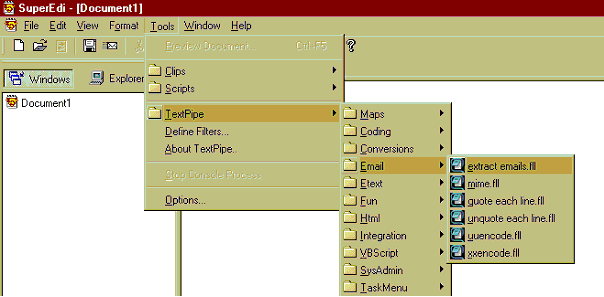
In a database, the option might be an ellipsis button […] in the import or export functions.
In a general application, TextPipe may be used to perform input or output processing.