Up
What's New in KeyboardLocker
KeyboardLocker is here, and has many new time-saving features to help you and your team
work smarter.
 |
Buy Download |

KeyboardLocker has all the new features you need to be more productive. Try KeyboardLocker today, you'll love how efficient you and your team can be!
New Features
What's New in KeyboardLocker v3.6 - May 26, 2013
* Fixed install error under x32.
You'll love what you can do with KeyboardLocker! Try it today.
Registered Users
Click here to login and download the upgrade, or to see if you are entitled to an upgrade.
Detailed Changes Log
What's New in KeyboardLocker v3.5.1 April 23, 2013
* /unlockandexit= option now does not show the main window (even briefly) when exiting.What's New in KeyboardLocker v3.5 April 19, 2013
* New command line option /unlockandexit=to both unlock and terminate the running instance of KeyboardLocker. What's New in KeyboardLocker v3.4 April 15, 2013
* KeyboardLocker now minimizes to the tray area when locked, and returns to being visible when unlocked.* The exit phrase can now be read out of the registry if the locker provides an encryption key to perform the encryption.What's New in KeyboardLocker v3.3 January 27, 2013
* Fixed bug where KeyboardLocker would not re-lock after being unlocked once.* Added new registry entry CtrlAltDelVisible which controls if the Ctrl+Alt+Del checkbox is visible or not, default true, set to 0 for not visible.What's New in KeyboardLocker v3.2 December 3, 2012
* Now Ctrl+Alt+Del is truly disabled under Windows 7 and 8 in addition to earlier Windows versions.What's New in KeyboardLocker v3.1 November 16, 2012
* Fixed encryption not working when the encrypted text did not end with ==What's New in KeyboardLocker v3.0 November 14, 2012
* Improved installer for unattended installation - application is not run on completion if the installation is silent, and any existing exit phrase in the registry is not overwritten.* Added /MINIMIZE command line optionWhat's New in KeyboardLocker v2.9 - October 31, 2012
* Passwords are now stored encrypted in the registry in the registered version.What's New in KeyboardLocker v2.8 - August 27, 2012
* Updated for Windows 7.* Dual x32 and x64 release.What's New in KeyboardLocker v2.7 - February 22, 2011
* Fixed immediate unlock issue.What's New in KeyboardLocker v2.6 - March 23, 2009
* New option to control if Ctrl+Alt+Del is disabled or not.* Better installation under Windows Vista.What's New in KeyboardLocker v2.5.8 - December 1, 2008
* Now only has short cut of Ctrl+Alt+L for one icon not two.What's New in KeyboardLocker v2.5.7 - May 13, 2008
* Now all .DLLs and .EXE files are signed for added security.What's New in KeyboardLocker v2.5.6 - May 1, 2008
* The Help Menu can now be hidden (to restrict Internet Access) if the registry entry HKEY_CURRENT_USER\Software\DataMystic\KeyboardLocker\hideHelp is set to 1.What's New in KeyboardLocker v2.5.5 - April 28, 2008
* Fixed installer including wrong DLL version.What's New in KeyboardLocker v2.5.4 - April 21, 2008
* Now cannot be uninstalled while running.What's New in KeyboardLocker v2.5.3 - April 18, 2008
* Fixed registry problem with Limited Accounts.What's New in KeyboardLocker v2.5 - April 14, 2008
* Now can run from limited Windows accounts* The Exit Phrase can now be preset and cannot be changed if the registry entry HKEY_CURRENT_USER\Software\DataMystic\KeyboardLocker\phraseLocked is set to 1.What's New in KeyboardLocker v2.4
* New command line parameters for setting the unlock password, and for changing the unlock password even while running.* Now can unlock KeyboardLocker from the command line.What's New in KeyboardLocker v2.3
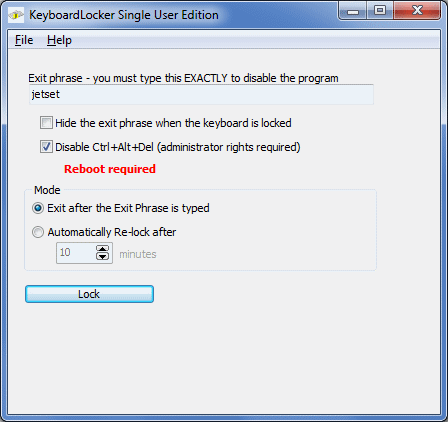
* Now can remain active and automatically re-lock after a given number of minutes. This makes it perfect for situations where a technician may forget to re-lock the keyboard locker.What's New in KeyboardLocker v2.2
* Now allows the exit phrase to be hidden from view, making it perfect for securing dedicated servers.What's New in KeyboardLocker v2.1
* Initial release - based on BabyShield 2.4See http://www.datamystic.com for more details on KeyboardLocker